


Connecting an external device via an AUX cable is especially useful if your BMW or Mini doesn’t have Bluetooth or if you don’t want to use Bluetooth for music playback. Using an AUX cable allows you to play audio in relatively high quality without having to worry about Bluetooth’s limited range or the sound quality that’s often lost when streaming via Bluetooth.
Connecting a device this way allows you to play music stored on that device through the speakers of the paired device.
The AUX/Jack cable only carries the audio signal. It’s not possible to display music information on the screen, nor to fast-forward or rewind music.
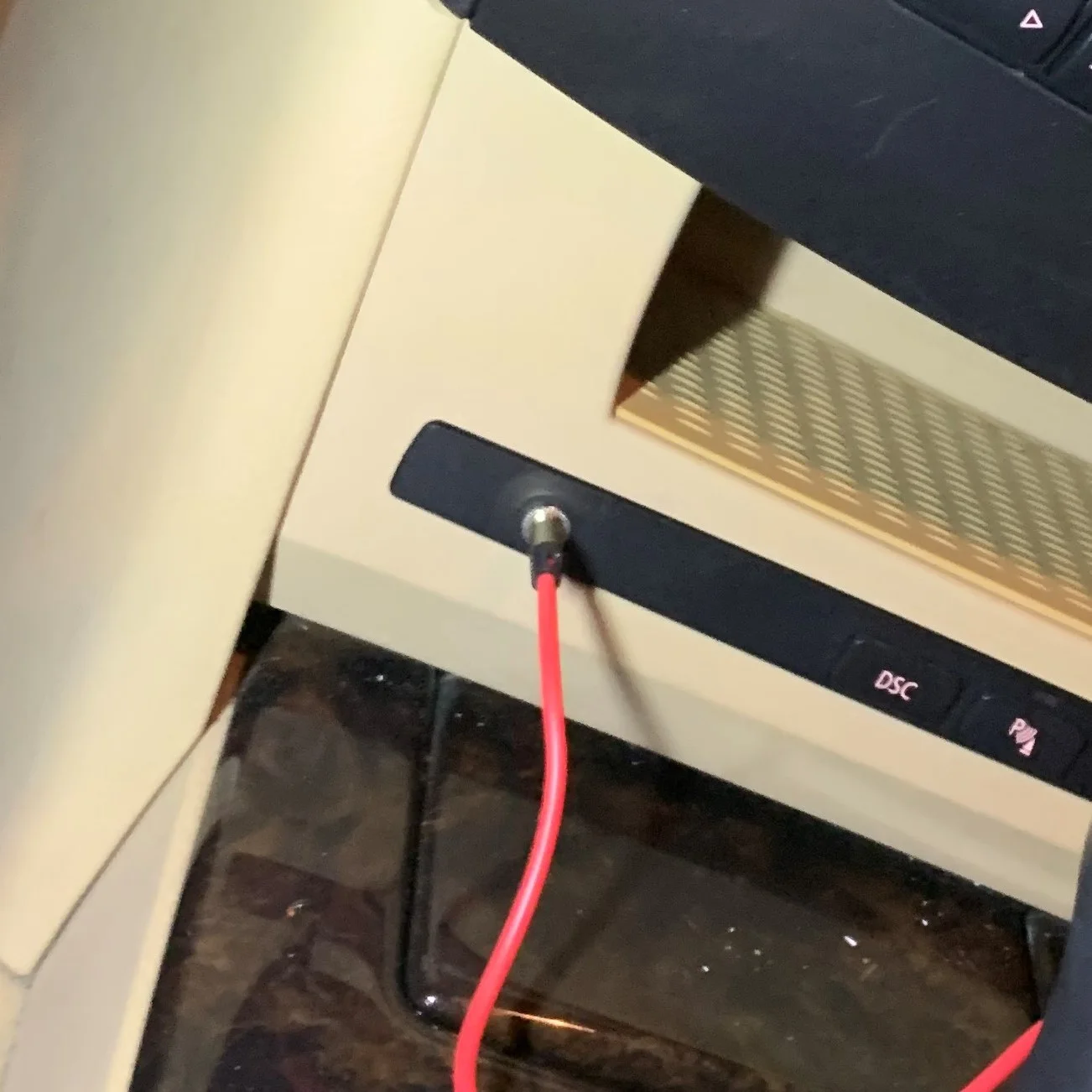
AUX activation without installation
Do you just want the AUX functionality to be learned? That’s possible too!
This may be necessary if you have built in an Android screen or AUX port yourself.
Enlist the help of Carware
Upgrade & Retrofit Possibilities
- Activate Apple CarPlay
- Retrofitting cruise control
- Installing an AUX connection
- Bluetooth audio / combox Retrofit
- CCC naar CIC Upgrade / Retrofit
- E9X M3 DCT gear ratio adjustment
- FRM3/LM2 Lighting Module Upgrade
- EWS write away E36 / E46 / E38 / E39
- MSD80 to MSD81 upgrade
- OEM software upgrade
- Steering Wheel Heating Retrofit
- Full software update BMW, Mini & Rolls Royce
- XHP gearbox optimization
- EDC Shock Absorbers Write Off
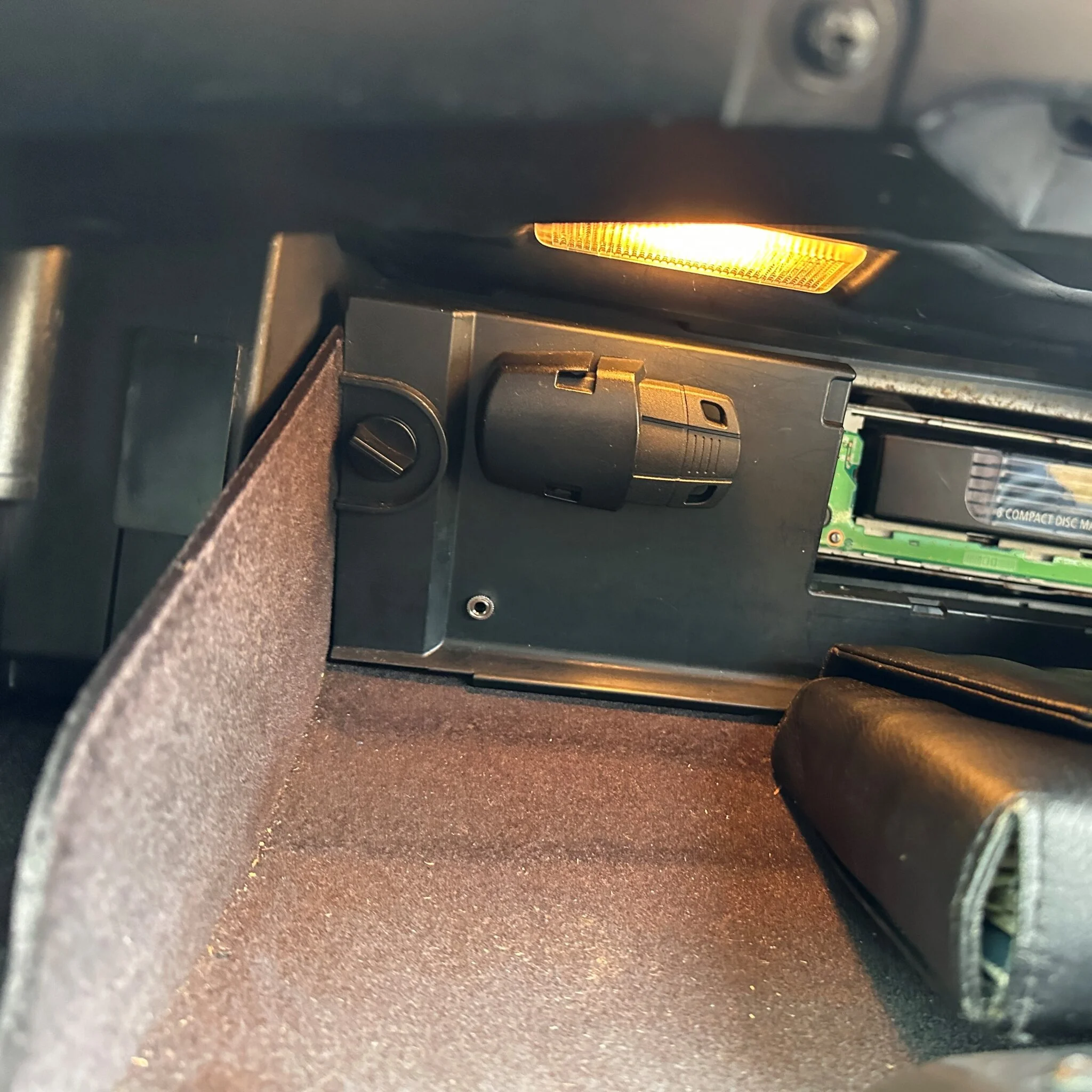
Carware has installed AUX connections dozens of times. You can install an AUX connection in the original location or in an alternative location. The advantage of an alternative location is that it’s often cheaper.
It is also possible to connect an AUX cable directly, instead of an AUX port.
See below for some pictures of possible locations.
References
What our customers say

Imad Moussaif
14:56 30 Sep 25
Great service, even with urgency it was very fast, it could be fixed the same day, I am very happy with it, definitely recommended!!

Dennis Mijling
18:53 25 Sep 25
Highly recommended to bring your BMW in if you need software updates or programming done! This guy knows what he's talking about and is willing to go the extra mile to make sure you go home satisfied! Thanks for the experience. Regards, Dennis (speeddonors)

Kevin W
13:28 20 Sep 25
Very satisfied with Carware! My dashboard lights stopped working, and owner Jan quickly found the cause. He honestly suggested I could fix it myself to save money—and he was absolutely right. Friendly service (even offered a drink) and very knowledgeable. Absolutely recommended! You won't find service like this again! 5/5 ⭐️

Rodney de Jong
07:48 18 Sep 25
Very satisfied with the work and the service. He keeps his appointments and delivers quality work. Jan is also a true specialist/expert and works very neatly. Highly recommended.

Kevin van Wijngaarden
09:09 13 Sep 25
After replacing several parts on my BMW M140 with no success, the ECU turned out to be the culprit. After some online research, I found Hagenaar Carware, where I received excellent service. Jan quickly diagnosed the problem correctly. He clearly explained the problem and the costs. Clear communication, no surprises, and expert service. Highly recommended for anyone with electronic problems with their BMW or MINI.

Hans van Stratum
12:26 06 Sep 25
My car has been parked since July 7th due to a malfunction in the electronic steering lock on my BMW E90.
Last year, the entire steering column was replaced, but after a few months, the same problem arose. No one could solve it, but after a long search online, I found Jan, and after a clear explanation and a potential solution, I regained hope.
Jan remotely—how?—really got my car running again and immediately wrote down all the malfunctions and error messages.
Jan is a hero! It's a shame you can only give 5 stars and not 10, otherwise he would have definitely earned them!
Last year, the entire steering column was replaced, but after a few months, the same problem arose. No one could solve it, but after a long search online, I found Jan, and after a clear explanation and a potential solution, I regained hope.
Jan remotely—how?—really got my car running again and immediately wrote down all the malfunctions and error messages.
Jan is a hero! It's a shame you can only give 5 stars and not 10, otherwise he would have definitely earned them!

Jos Kuijs
11:22 27 Aug 25
I had a problem with the ROC module for my BMW. Jan neatly fixed all the error codes and reinstalled the module. A fantastic solution, instead of having a new and expensive module replaced at the garage. Jan communicates quickly and honestly about the options and any risks. He also provides immediate clarity about the costs. In short, I understand why all the reviews here are 5 stars, and this one adds another 5 stars!
Response from the owner 06:46 01 Sep 25
Jos, dank voor je leuke review en je lovende woorden. Daar doen we het voor! 🙂
Jan Raveyts
15:00 17 Aug 25
The ECM of a 320 convertible was repaired and updated with new software. The car now drives smoothly and better than ever. Excellent service! Perfect! Highly recommended!
Response from the owner 06:46 01 Sep 25
Dank voor je lovende woorden!
Joost van Dongen
19:33 07 Aug 25
I have an old BMW Z3, and after winter storage, it wouldn't start.
Jan was able to come on-site within two days to scan the Z3, but unfortunately, that wasn't possible because the Z3 has an older system.
Luckily, Jan still had an old laptop with the correct software.
He quickly realized the AWS module was malfunctioning. He gave me tips on how to work around this and adjusted the ECU. And yes, it's running like a charm again.
Excellent, clear communication, good advice.
Simply a true professional.
We need more of them.
Jan was able to come on-site within two days to scan the Z3, but unfortunately, that wasn't possible because the Z3 has an older system.
Luckily, Jan still had an old laptop with the correct software.
He quickly realized the AWS module was malfunctioning. He gave me tips on how to work around this and adjusted the ECU. And yes, it's running like a charm again.
Excellent, clear communication, good advice.
Simply a true professional.
We need more of them.
Response from the owner 06:47 01 Sep 25
Joost, dank voor je leuke review. En veel rijplezier toegewenst in je Z3!
Opperhoofd Cristian
20:04 18 Jul 25
My frame broke.
He expertly repaired it for me.
Great service.
I was able to get an appointment within two hours and it was fixed within half an hour. Absolutely fantastic.
Highly recommended 👌👌
He expertly repaired it for me.
Great service.
I was able to get an appointment within two hours and it was fixed within half an hour. Absolutely fantastic.
Highly recommended 👌👌
Response from the owner 09:57 28 Jul 25
Dankjewel Cristian voor je review. En fijn dat je FRM het weer helemaal doet
Johan Peeters
19:03 17 Jul 25
We had Jan install original BMW cruise control in our BMW Z4. Everything was expertly installed and thoroughly tested. Jan works calmly and consistently. Highly recommended!
Response from the owner 09:58 28 Jul 25
Ha Johan,Fijn dat je blij bent met de originele cruise control. Origineel blijft in onze ogen de mooiste oplossing voor je Z4.Hartelijke groet,Carware
Piet Meilink
20:23 08 Jul 25
After some online research, I found Hagenaar Carware for an upgrade to the DCT gearbox in my BMW E92 M3, specifically the GTS software. After contacting them through the app, I was able to quickly schedule an appointment.
Once I arrived, Jan already heard me 🥳. He immediately grabbed the laptop to check everything for error codes, after which the software could be installed. Meanwhile, Jan changed my menu to Dutch (it was in English), completely free of charge 👌
After an hour, we were back on the road, and the shifting was so incredibly fast.
Thanks, Jan!
Once I arrived, Jan already heard me 🥳. He immediately grabbed the laptop to check everything for error codes, after which the software could be installed. Meanwhile, Jan changed my menu to Dutch (it was in English), completely free of charge 👌
After an hour, we were back on the road, and the shifting was so incredibly fast.
Thanks, Jan!
Response from the owner 09:59 28 Jul 25
Ha Piet,Het werken aan een E92 M3 is altijd extra leuk. Fijn dat je tevreden bent, en het mooie V8-geluid was inderdaad al van ver te herkennen ;-)Hartelijke groet,Carware
Luiz Curado
06:57 31 Oct 23
Jan is very knowledgeable and specialised in BMW. He had the right equipment and didn’t leave a mark on the car!
Was looking for a while for CarPlay for my X1 and he was very professional since the first contact. And he delivered exactly what was promised. Working like a charm. Thank you! Highly recommended.
Was looking for a while for CarPlay for my X1 and he was very professional since the first contact. And he delivered exactly what was promised. Working like a charm. Thank you! Highly recommended.

Oscar Van Hemel
17:34 12 Sep 23
Amazing service! He really knows his stuff and is very kind. I came because my car was not coming through the “vehicle safety inspection” because of a E-CALL error. Since 2023 its mandatory to work in The Netherlands.. Additionally he gave me advice about error codes, their meaning, auto mirror fold and digital speedo also coded in. Pricing is also very fair.
Recommended!
Recommended!

Ronald Stelt
14:49 16 Jun 23
Recommended by a friend, and contacted Hagenaar Carware. Wanted to change the language of the infotainment and install bluetooth and aux in on my BMW E60. This was all perfectly done by Jan. Good service and I will recommend this to anybody else.

S Z (YippingFox)
17:02 28 Apr 23
Went out to get cruise control fitted to the car, as well as changing the language of the infotainment system to Dutch. Everything works as told beforehand. He was also so kind to add in a digital speedometer and changing the wipers so that they go down even after shutting off the engine. Beforehand he did an inspection for any faults in the car, which surprisingly came up clean. Very kind and happy to tell you about the process as he goes along.

Djowie Dupree
11:53 03 Sep 22
Top service! He did the apple CarPlay full screen coding for me very happy with that works perfect. And recently over the air service reset because I do my maintenance myself this is a very good service for me as a home mechanic. Every time very fast response and takes time to explaining the things he do to your car. I would recommend his expertise to anyone


Request a quote or more information

Unlimited BMW software knowledge

Full Remote

Fast & Reliable

Retention of Aftermarket

Internationally active

Maximum safety